
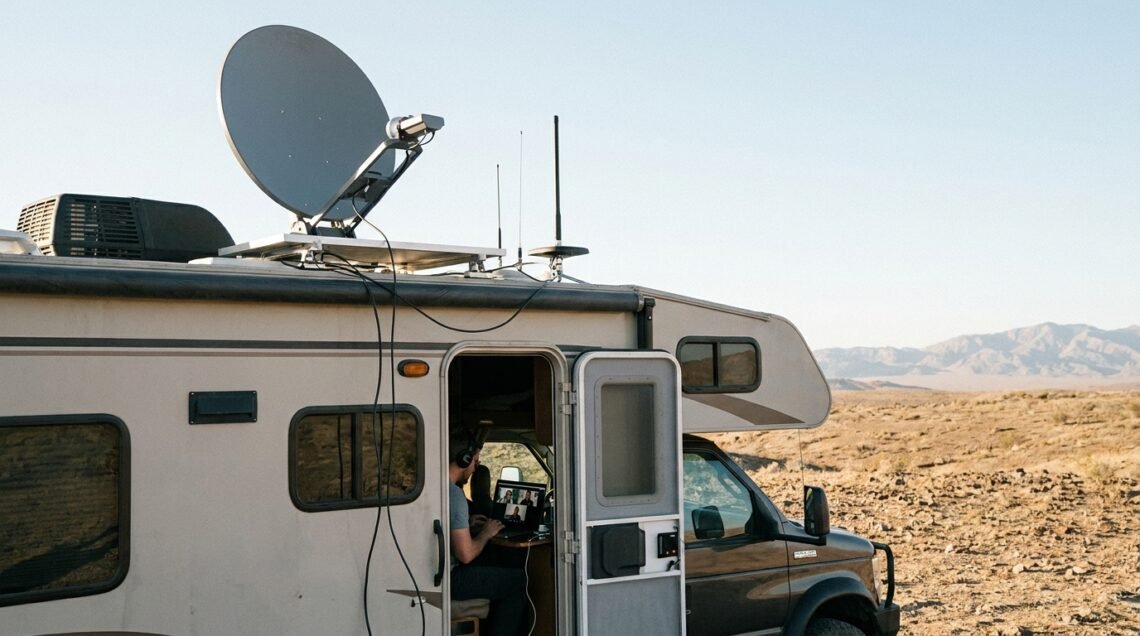
Understanding Your RV Internet Needs
Reliable internet has become almost as important to many RVers as reliable electricity and water.
Whether you’re working remotely, running a business, streaming your favorite shows, keeping up with family, or simply using your phone to find your next campsite, losing your connection at the wrong time can be frustrating.
The good news is that getting dependable internet in an RV doesn’t necessarily require an expensive or complicated setup.
The key is understanding the different ways you can get online and choosing a combination that fits the way you travel.
For some RVers, a smartphone hotspot is enough. Others may need a dedicated cellular router, multiple carriers, or satellite internet. And if you’re someone who works from the road, having a backup connection can make a huge difference.
Let’s look at the options and how to build an RV internet setup you can actually depend on.
Table of Contents
What Do You Actually Do Online?
Start by thinking about how you use the internet.
If you’re mostly browsing websites, checking email, using social media, getting directions, and occasionally watching a video, you may not need much more than your existing phone plan. If you work remotely while traveling, our guide to working from an RV covers how to create a productive mobile office and maintain a reliable connection.
Your needs change considerably if you’re:
- Working remotely
- Attending frequent video meetings
- Uploading and downloading large files
- Streaming several hours of television each day
- Using cloud-based software
- Running an online business
- Connecting multiple computers and smart devices
The more demanding your internet use, the more important speed, data allowances, and connection stability become.
Where Do You Usually Camp?
Your typical camping locations may be even more important than your internet equipment.
An RVer who spends most nights in developed campgrounds near towns will generally have more connectivity options than someone who regularly boondocks in remote forests or desert areas.
Cellular service can be excellent in one campground and nearly nonexistent at the next.
Terrain also matters. Mountains, valleys, thick vegetation, and distance from a cell tower can all affect cellular reception.
Before heading somewhere new, it’s worth checking the coverage available from the carriers you use.
How Many People and Devices Need to Connect?
A single person using a phone and laptop requires considerably less from an internet system than a family with several phones, tablets, computers, televisions, and gaming devices.
Think about how many devices will normally be online at the same time.
This will help determine whether a smartphone hotspot is sufficient or whether a dedicated router makes more sense.
Cellular Internet: The Go-To Option for Most RVers
For many RVers, cellular data is the easiest and most practical way to get online.
Modern cellular networks can provide surprisingly good speeds, even outside major cities. In areas with strong coverage, cellular internet can handle everything from everyday browsing to video calls and streaming.
The biggest advantage is convenience.
You don’t need a satellite dish, and you don’t have to depend on campground Wi-Fi. If your carrier has a usable signal, you can often get online within minutes.
There is one major limitation, however: cellular coverage isn’t everywhere.
That’s why experienced RVers often have more than one way to connect.
Dedicated RV and Camper Internet Plans
Some carriers and internet providers offer plans designed specifically for people who travel or use cellular internet away from a traditional home connection.
These plans can be attractive because they may provide more data or different terms than a standard smartphone plan.
One example is T-Mobile’s AWAY offering, which is aimed at travelers and RV users.
However, plans and pricing can change, so don’t choose a service based solely on an old article or a price you saw months ago.
Before signing up, check the provider’s current terms and make sure the plan fits your expected data usage and travel areas.
The most important question isn’t simply, “Is this unlimited?”
How much high-speed data will I actually have, and what happens after I use it?
Using Your Existing Phone Plan
If you’re an occasional RVer, you may already have everything you need.
Most modern smartphones can create a personal hotspot. Your phone connects to the cellular network and then shares that connection with your laptop, tablet, streaming device, or other equipment.
It’s simple and convenient.
The downside is that hotspot data is often treated differently from the data you use directly on your phone.
A plan may advertise unlimited smartphone data while providing a much smaller allowance for hotspot use.
Once you reach that allowance, your hotspot speeds may be reduced.
Always check the details of your particular plan before assuming you can use your phone as your RV’s primary internet connection.
Unlimited vs. Capped Data
“Unlimited” doesn’t always mean unlimited high-speed hotspot data.
Many plans include a certain amount of premium or high-speed data and then reduce speeds after that amount has been used.
If you stream a lot of video or work remotely, you can reach those limits faster than you might expect.
When comparing plans, look beyond the word “unlimited” and check:
- High-speed data allowance
- Hotspot data allowance
- Speeds after reaching the limit
- Network deprioritization
- Video streaming restrictions
- Coverage
- Monthly cost
Those details will tell you much more about how useful a plan will be in your RV.
Cellular Hotspots and Routers
If you’re using cellular internet regularly, moving beyond your smartphone can make sense.
There are two common choices: a dedicated mobile hotspot or a cellular router.
Dedicated Cellular Hotspots
A dedicated hotspot, sometimes called a MiFi or mobile hotspot device, connects directly to a cellular network and creates a Wi-Fi network for your other devices.
The advantage is that your phone remains available for normal use and you aren’t constantly draining its battery by running a hotspot.
A dedicated hotspot can also be easier to leave in a good reception location while you use your other devices elsewhere in the RV.
Some models also support external antennas, depending on the device.
Cellular Routers
A cellular router is a more permanent solution.
Instead of simply creating a small hotspot, a router is designed to function as the central internet connection for your RV.
Depending on the model, you may get features such as:
- External antenna connections
- Ethernet ports
- Stronger Wi-Fi coverage
- Support for multiple devices
- Advanced network management
- Multiple cellular connections
- Failover between internet sources
For a full-time RVer or remote worker, a dedicated cellular router can be a worthwhile investment.
What About Advanced Routers?
There are also more advanced networking systems designed for RVers and mobile businesses.
Peplink is one example of a manufacturer known for cellular networking equipment and multi-WAN networking.
These systems can combine multiple internet connections and automatically switch between them when one connection becomes unavailable.
They can be more expensive and complicated than most casual RVers need, but for someone whose income depends on staying connected, the additional flexibility can be valuable.
The Importance of Redundancy
Here’s one of the most important lessons when it comes to RV internet:
Don’t put all your connectivity eggs in one basket.
Every internet connection has weaknesses.
A cellular network can have a dead zone. A campground Wi-Fi system can become overloaded. A satellite dish can be blocked by trees.
If you depend on the internet, having another option available can save the day.
Why Use Two Cellular Carriers?
Different carriers don’t always have the same coverage.
You might have an excellent Verizon signal at one campsite and discover that T-Mobile works better a few miles away. At another location, AT&T might be the better choice.
Having access to two different networks greatly increases your chances of finding a usable connection.
You can accomplish this by using:
- Two separate hotspots
- A router that supports multiple cellular connections
- A phone on one carrier and a hotspot on another
- Multiple SIMs where supported
You don’t necessarily need three carriers.
For many RVers, having two different networks available is a substantial improvement over relying on one.
Satellite Internet for Remote RV Camping
Cellular internet works well when you have access to a cell tower.
But what happens when you don’t?
That’s where satellite internet becomes especially useful.
Satellite systems communicate with satellites rather than nearby cellular towers, allowing them to provide internet service in places where traditional wired or cellular options may not be practical.
For RVers who spend a lot of time boondocking, this can be a game changer.
Starlink for RVers
Starlink has become one of the best-known satellite internet options for people who travel.
Its portable equipment and mobile service options make it particularly interesting for RVers.
Instead of depending on a nearby cellular tower, the Starlink system communicates with satellites overhead.
That makes it possible to get online in many remote locations where cellular service may be unavailable.
However, satellite internet isn’t perfect.
Starlink Roam
Starlink’s Roam service is designed for people who want to use their equipment while traveling.
Because Starlink’s plans, availability, equipment options, and pricing can change, check the current offerings before purchasing.
Don’t rely on an older price or plan description when making your decision.
The Starlink Mini
Smaller satellite equipment has also made satellite internet more practical for some RVers.
A smaller system can be easier to store and transport, which is a major advantage when space is limited.
For someone who only occasionally needs satellite internet, portability may be more important than having the largest or most powerful equipment available.
What to Expect From Satellite Internet
Satellite internet can solve a major connectivity problem, but it comes with trade-offs.
Speed and Latency
Modern satellite internet can provide useful broadband speeds, but performance can vary based on location, network conditions, and obstructions.
Latency can also be different from what you’re used to with a strong wired connection.
For ordinary browsing, streaming, email, and many work applications, this may not matter much.
Real-time applications such as competitive gaming or other latency-sensitive activities can be more affected.
You Need a Clear View of the Sky
This is one of the biggest considerations for RVers.
Trees are beautiful.
They’re also really good at getting in the way of satellite signals.
A campsite surrounded by tall trees may be a great place to relax but a poor location for satellite internet.
Buildings, hills, and other obstructions can also interfere with the connection.
Sometimes you may need to move the dish away from the RV to find a better view of the sky.
Power Consumption
Satellite equipment requires electricity.
That’s not a major concern when you’re plugged into campground power, but it becomes much more important when you’re boondocking.
If you’re running on batteries and solar, include your internet equipment in your daily power budget.
Your computer, monitor, Starlink system, phones, and other electronics can add up quickly.
The Best Strategy: Combine Your Internet Options
For many RVers, the best internet setup isn’t one connection.
It’s a combination.
Think of your internet system in layers.
Primary Connection
Use cellular service for everyday internet when you have a good signal.
Backup Cellular Connection
Use another carrier when your primary network isn’t available or is heavily congested.
Remote Backup
Use satellite internet when you’re camping somewhere cellular coverage doesn’t reach.
Campground Wi-Fi
Use campground Wi-Fi when it’s available and performs well.
This approach gives you choices.
You aren’t forced to depend on one connection everywhere you go.
The Split Strategy: Cellular Plus Satellite
One of the most practical combinations for serious RV travelers is cellular plus satellite.
Use cellular for everyday internet when you’re near reliable coverage.
It’s convenient, generally easy to set up, and doesn’t require positioning a dish.
Then use satellite internet when you head farther into the backcountry.
You may not even need to run the satellite system every day.
That can save power and reduce unnecessary wear on the equipment while allowing you to have a connection when you really need one.
Don’t Forget Your Backup Plan
Even a good cellular connection can fail.
Networks experience outages. Towers can become congested. Equipment can malfunction.
That’s why it’s smart to have a simple backup plan.
For example:
Primary: Cellular router
Backup: Smartphone hotspot on another carrier
Remote option: Satellite internet
Your backup doesn’t have to be elaborate.
If you’re only using the internet for entertainment, your phone may be enough.
If you’re working remotely, your backup system deserves more attention.
Campground Wi-Fi: Convenient but Unpredictable
Many campgrounds advertise Wi-Fi, and it’s tempting to make that your primary internet connection.
Sometimes it works great.
Sometimes it doesn’t.
Campground Wi-Fi is shared among many users. During busy evenings, dozens of campers may be streaming movies, making video calls, gaming, and browsing at the same time.
Performance can drop dramatically.
The location of your campsite can also affect the signal you receive.
For these reasons, campground Wi-Fi is best viewed as a convenience or backup rather than the foundation of your internet system.
Is Campground Wi-Fi Safe?
Public and shared Wi-Fi networks also deserve some caution.
Avoid doing sensitive transactions over an unfamiliar network unless you are comfortable with the network’s security.
Keep your devices updated, use strong passwords, and consider using a reputable VPN when appropriate.
A Wi-Fi connection may be convenient, but you should still treat it as a public network.
Hardware Considerations for RVers
The right equipment can make your internet setup much more useful.
Antennas and Boosters
An external cellular antenna can help your router or hotspot receive a better signal, particularly when the equipment can be positioned in a location with fewer obstructions.
A cellular booster is another possibility.
A booster receives an available cellular signal through an outside antenna and improves the signal inside the RV.
But remember that a booster can’t manufacture a signal.
If your carrier has absolutely no service in an area, amplification won’t create coverage that isn’t there.
Where You Put Your Equipment Matters
Before buying new equipment, experiment with placement.
Moving a hotspot closer to a window or placing it higher inside the RV may improve reception.
An external antenna can often be positioned where it has a better chance of receiving the signal.
With satellite internet, positioning becomes even more important because the dish needs an unobstructed view of the sky.
Sometimes a few minutes of experimenting can make a bigger difference than spending hundreds of dollars on new equipment.
Don’t Overlook Power Requirements
Your RV’s internet equipment uses electricity.
A smartphone hotspot generally has a relatively small power requirement, but a dedicated router, Wi-Fi equipment, computer, monitor, and satellite system can create a much larger electrical load.
This is particularly important for boondockers.
If you’re running on batteries and solar, look at how many hours per day each device will operate.
For example, someone working remotely might have a router, laptop, monitor, and other equipment running for most of the day.
Add satellite internet to that setup and your daily electrical consumption can increase substantially.
Make sure your battery bank and charging system can support your internet habits.
Protect Your Equipment From Heat
RV interiors can get extremely hot.
Try not to leave routers, hotspots, laptops, or other electronics sitting in direct sunlight or inside poorly ventilated cabinets.
Good airflow helps electronics operate more reliably.
The same applies to outdoor equipment.
Protect antennas, cables, connectors, and satellite equipment from unnecessary exposure to moisture and physical damage.
Your internet equipment is an investment. Treat it like one.
Test Your Internet Setup Before a Trip
One of the easiest ways to prevent problems is to test everything before you leave home.
Make sure your:
- Hotspot works
- Cellular router connects
- SIM or eSIM is active
- Backup carrier works
- Wi-Fi network is configured
- Satellite system is functioning
- Devices can connect
- Power system can handle the load
If you work remotely, do a realistic test.
Join a video meeting.
Upload a file.
Download something large.
Stream a video.
Use the software you normally use for work.
It’s much better to discover a problem in your driveway than after you’ve driven several hundred miles into the wilderness.
Check Internet Coverage Before You Travel
Don’t assume your internet connection will work at your next campsite simply because it worked at your last one.
Before traveling, check the coverage maps for your cellular providers.
It’s also helpful to research the campground or public-land area you’re considering.
Recent campground reviews can sometimes provide useful information about which carriers work well in the area.
Keep in mind that coverage maps are estimates. Actual service can vary depending on terrain, weather, congestion, network conditions, and your exact campsite.
How Much Internet Do You Really Need?
It’s easy to get caught up in speeds and equipment specifications.
But faster isn’t always better if you don’t need it.
Someone who checks email and browses the web doesn’t need the same setup as someone who uploads large video files every day.
Consider these basic categories:
Light Internet Use
For email, browsing, maps, social media, and occasional streaming, a smartphone hotspot or basic cellular plan may be enough.
Moderate Internet Use
For regular streaming, multiple devices, and occasional remote work, consider a dedicated hotspot or cellular router.
Heavy Internet Use
For full-time remote work, frequent video meetings, large uploads, and multiple users, a dedicated router and generous data plan make more sense.
Remote and Heavy Use
If you combine heavy internet use with remote boondocking, consider multiple cellular carriers plus satellite internet.
Building Your Ideal RV Internet Setup
There is no single “best RV internet setup.”
The right combination depends on your travel style.
Weekend RVer
A smartphone hotspot may be all you need.
Frequent Traveler
A dedicated hotspot or cellular router can make life easier.
Full-Time RVer
Consider a dedicated router, a good cellular plan, and a backup carrier.
Remote Worker
Redundancy becomes much more important. Two cellular networks and satellite internet may be worth the additional expense.
Serious Boondocker
Satellite internet combined with multiple cellular options provides the greatest flexibility when traveling far from populated areas.
You don’t have to build the most expensive system right away.
Start with what you need and add equipment as your travel style changes.
Final Thoughts
Reliable RV internet isn’t about finding one perfect device.
It’s about having the right connection for the place you’re in.
Cellular service is often the easiest starting point. A smartphone hotspot may be enough for occasional use, while a dedicated cellular router can provide a more capable network for people who spend more time online.
Adding a second cellular carrier gives you another option when your primary network doesn’t work.
For remote camping, satellite internet can fill the gap when cellular towers are nowhere nearby.
And campground Wi-Fi can be useful when it’s available and performing well.
The most important thing is to understand your own needs.
Think about where you camp, how often you need internet, how much data you use, how many devices you connect, and what happens if your primary connection fails.
If being offline isn’t a big deal, keep your setup simple.
If you work from your RV or depend on the internet for your business, invest in redundancy.
A reliable RV internet setup doesn’t have to be complicated. It just needs to give you enough options to stay connected when your travels take you somewhere your primary connection can’t.
FAQs
1. What are the options for getting reliable internet in an RV?
The main options are cellular data, smartphone hotspots, dedicated mobile hotspots, cellular routers, campground Wi-Fi, and satellite internet. Many RVers combine two or more options for better reliability.
2. What is a mobile hotspot and how does it work for RV internet?
A mobile hotspot uses a cellular connection to create a Wi-Fi network. Other devices, such as laptops, tablets, and streaming devices, can connect to that network and use the cellular data connection.
A smartphone can work as a hotspot, or you can use a dedicated hotspot device.
3. How does satellite internet work for RVs?
Satellite internet uses a dish or terminal to communicate with satellites and provide an internet connection. It can be particularly useful in remote locations where cellular service isn’t available.
The satellite equipment generally needs a relatively clear view of the sky.
4. What should I consider when choosing an RV internet service?
Look at coverage, high-speed data allowances, hotspot restrictions, network performance, monthly cost, equipment requirements, and where you normally travel.
Don’t choose a plan based solely on the advertised speed or the word “unlimited.”
5. How can I improve internet reliability in my RV?
Start by choosing a carrier with good coverage where you travel. A dedicated cellular router, external antenna, or cellular booster may help in areas with weak but usable cellular signals.
You can also improve reliability by carrying a second cellular carrier or satellite internet as a backup.
Finally, test your equipment before every major trip and make sure your RV’s electrical system can support your internet equipment.
Bottom Line
The best RV internet setup is the one that matches your travel style.
Use cellular for everyday connectivity. Add a second carrier for redundancy. Consider satellite internet for remote locations. And don’t count on campground Wi-Fi as your only connection.
With a little planning, you can spend less time fighting with your internet connection and more time enjoying the road.


